Bring Facebook & WhatsApp together with Click to WhatsApp Ads
Do you run a business Facebook Messenger, are you active on Instagram, and do you also use WhatsApp for customer communication? Great, then you have three key foundations for raising awareness of your company while connecting with your customers.
Do you know how to top off these efforts? By directing your Instagram and Facebook fans to your WhatsApp chat so you can communicate with them quickly and directly.
How does it work? With the "Click to WhatsApp" feature.
WhatsApp Marketing via Click to WhatsApp Ads: What does it mean?
Click to Chat via WhatsApp, sometimes written as Click2WhatsApp, is an interesting feature within the Facebook ecosystem. Since Instagram and WhatsApp are part of the Facebook group, they are increasingly merging.
With Click to WhatsApp, you add a button to your ads on Instagram and Facebook. That is why the feature is correctly referred to as Click to WhatsApp Ads.
Benefits: Why do you need Click to WhatsApp Ads?
On Facebook and Instagram, no one sees every post from the friends and accounts they follow anymore. The reason: an algorithm filters what you see and what you don't. It essentially sorts your feed.
This is a major disadvantage for businesses in particular, as their content is only shown to a fraction of their followers. Many of their messages simply fizzle out. You can prevent this by using an advertising budget to boost your posts on Instagram and Facebook. In short, you have to pay for your reach.
If you run ads, they need to perform as well as possible. The goal is often to "convert" a user: usually, they should click a link and then perform an action—such as buying a product in your online shop.
Another form of conversion is direct communication with you or your company. For example, to schedule an appointment or to give you feedback on a topic.
Click to WhatsApp Ads are perfect for this. When a user clicks the button integrated into the ad, they land directly in your WhatsApp chat. You can get started immediately—without interruptions or other "showstoppers."
Example: How you can use Click-to-WhatsApp Ads
Let's say you run a fashion store. When you receive new stock, you photograph it and create a Click to WhatsApp ad with the image. The ad might say something like, "New jeans have arrived. What size do you need? Send us a message!"
Through the ad, you invite a dialogue. If your customers respond, you find out their size to set the right jeans aside. You can also encourage them to book a fitting appointment via chat. If your store is closed due to a lockdown, you can simply arrange a time for them to pick up the jeans.
Requirements: What you need for these special Facebook ads
Getting started with Click to WhatsApp Ads is quite simple:
- You must have a business Facebook page and be its administrator.
- For WhatsApp, you need a business account. You can get one by setting up WhatsApp Business or by using the WhatsApp Business API, which is integrated into ChatWerk.
Important: This does not work with the "standard" version of WhatsApp! - Link Facebook to WhatsApp by entering your WhatsApp details in your Facebook settings.
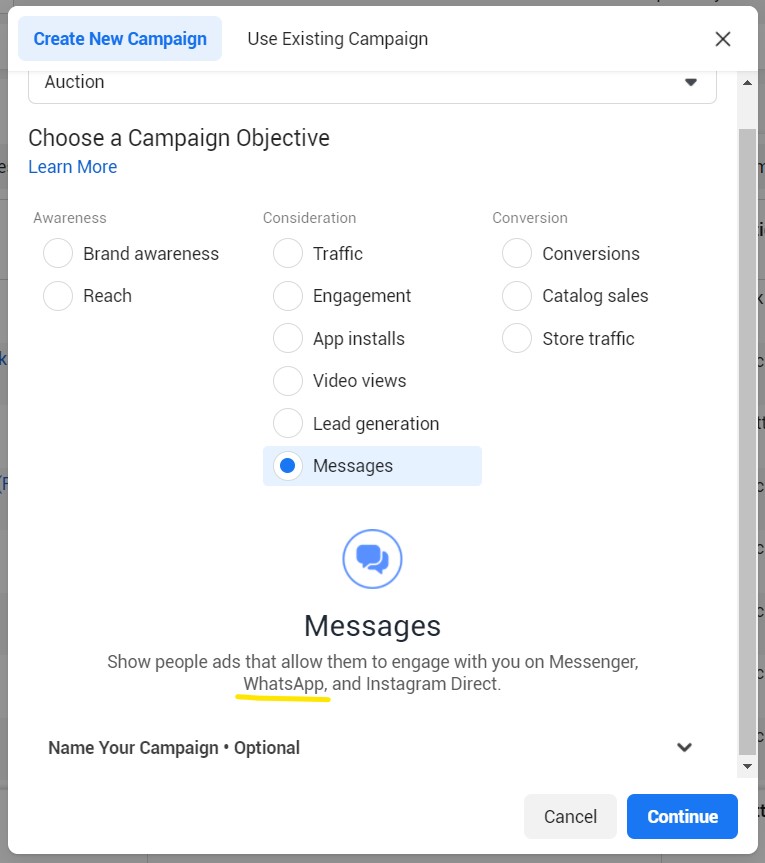
Quick guide: How to create a WhatsApp Ads campaign
- You can run these ads in the Facebook Ads Manager or via the Facebook navigation menu.
- Start a new campaign and select "Messages" as your campaign objective.
- Take a close look at the following advertising options and choose the settings that work best for you.
- During the ad creation process, you will see a section called "Call to Action." Select the WhatsApp option here.
- At the end of the process, you can launch your Click to WhatsApp ad by clicking "Publish."
Note: Facebook updates the design of its Ads Manager from time to time. Therefore, it is advisable to read the official guide.
Seize every opportunity for customer communication
Make it as easy as possible for your customers to ask questions, order products, or provide feedback! A great way to do this is the Click-to-WhatsApp feature—whether as a simple link, a QR code, or WhatsApp Ads via the Facebook Ads Manager.
The latter, in particular, is a wonderful way to bridge the gap between the offline and online worlds. Minimal effort, maximum success—sometimes it really can be that simple.
Lerne noch mehr über Kundenkommunikation
Weitere spannende Blogartikel rund um Marketing, Automatisierung und digitalen Kundenservice.