
WhatsApp is long since more than just a messenger – it is a direct line to your customers. But who has the time to manually answer every inquiry around the clock? This is where the magic of automated WhatsApp messages comes in. With clever templates, you can not only react to inquiries in a flash but also leave a lasting impression. In this article, we show you how WhatsApp auto-replies can help you save time and take your communication to the next level – including practical examples and professional tips.
What is an automated WhatsApp reply?
The automated reply feature in WhatsApp allows businesses to send automatic messages to confirm receipt of customer inquiries or to set expectations for response times when you are unavailable to answer incoming WhatsApp messages.
Best practices for WhatsApp auto-reply messages
- Keep auto-reply messages short and concise.
- Adapt the messages to your company's voice and tone.
- Ensure that the auto-reply messages contain relevant information.
- Provide clear instructions if further support is needed.
- Regularly review your auto-reply messages to ensure they are current and accurate.
- Use the WhatsApp Business app or third-party apps like ‘AutoResponder’ to set up and manage automated replies.
Example 1: Greeting message

One of the most important functions of an auto-reply message is the ability to warmly welcome customers. This creates a positive customer experience and shows that the company is attentive.
Such a greeting message could, for example, read:“Welcome to [Company]. Thank you for contacting us. Our team will look into your inquiry as soon as possible.”
Example 2: Away messages
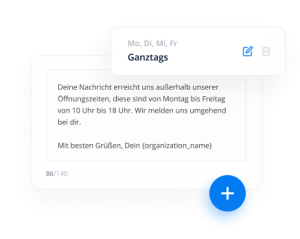
Sometimes it may happen that a company is temporarily unable to respond to customer inquiries immediately. In such cases, it is important to inform customers about the delay and offer them an alternative solution.
This is where away messages come in, which are automated replies that can be set up via the WhatsApp Business app. These messages inform customers about the company's absence, opening hours, or alternative contact options, and contribute to transparency and professionalism.
An example auto-reply message for such situations could read:“Thanks for your message. Our team is currently unavailable, but we will get back to you within 24 hours. For urgent matters, please contact [Alternative contact information].”
Example 3: FAQs and common inquiries
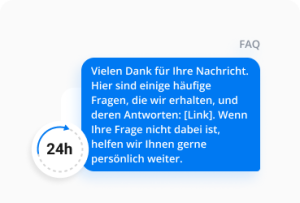
Another useful way to use autoresponder messages is to provide answers to frequently asked questions. By creating a list of common inquiries and their corresponding answers, companies can offer their customers an immediate solution.
An FAQ auto-reply message could look like this, for example:“Thanks for your message. Here are some common questions we receive and their answers: [List of common questions and answers]. If your question isn't covered here, we’ll be happy to assist you personally.”
Tips for effective automated reply messages
Here are some precise tips to make your automated reply messages more effective:
1. Keep it short and simple
Avoid long messages and use concise information that is easy to understand.
2. Set expectations
Clearly state when customers can expect a response and inform them of business hours to avoid frustration.
3. Add a personal touch
Include the customer's name or a friendly greeting to build a personal connection.
4. Alternatives, resources, and ChatGPT
Offer alternative contact options or helpful links to FAQs and product catalogs to support customers with their requests. You can use tools like ChatGPT to draft tailored and creative messages. Make sure to craft your communication in a way that appeals to your target audience. Automated replies, like those used on WhatsApp, can also be used for emails. Such automated emails, for instance for welcome messages or birthday wishes, are effective communication tools that optimize customer service and ensure availability.
5. Mind the tone
Use a friendly, professional tone that is appropriate for your company and treats customers with respect.
Our WhatsApp templates make it easy to customize your customer communication.Click here to copy and paste.
Message templates for WhatsApp: Your personal guide
WhatsApp has become a valuable tool for businesses looking to communicate quickly and efficiently. With WhatsApp message templates, you can streamline your communication process and save time while delivering personalized and engaging messages to your audience. In the WhatsApp Business app, you can use these templates to set up automated responses, such as away messages and quick replies, specifically designed for the needs of small businesses.
Why should you use WhatsApp message templates?
As a WhatsApp API user, you cannot message your customers on WhatsApp at any time. Outside of the 24-hour customer service window, you are only permitted to use WhatsApp message templates, also known as template messages. These templates allow you to connect with customers outside of the aforementioned 24-hour window while maintaining the quality of your communication. As a messaging service, WhatsApp plays a crucial role in business communication by enabling companies to set up automated responses, ensuring that customer inquiries are answered promptly even when staff are not immediately available.
What do template messages look like for WhatsApp users?
You can personalize WhatsApp message templates with customizable placeholders, media headers, and quick reply or call-to-action buttons. These features make WhatsApp message templates more engaging and interactive than other message formats like SMS or email. Furthermore, these templates help manage communication with contacts efficiently by enabling automated responses for specific individuals or groups from your contact list.
What are the costs associated with sending WhatsApp message templates?
Sending WhatsApp message templates is not free. They are subject to WhatsApp's conversation-based pricing model, meaning costs depend on the recipient's country code and the category of the message template.
WhatsApp Message Templates: Categories and Use Cases
To prevent businesses from spamming their contacts, Meta restricts the use of WhatsApp message templates to a limited number of use cases. Here are the approved use cases for message templates by category:
Conclusion
WhatsApp autoresponder messages allow you, as a business, to respond efficiently to customer inquiries and ensure a positive customer experience. Through strategic use and adherence to best practices, you can save time and increase customer satisfaction. Custom message templates offer endless possibilities for engaging your audience. With the right tips, you can start creating your own WhatsApp message templates immediately. To ensure their effectiveness, you should follow Meta's guidelines regarding use cases, content rules, and formatting. By following these rules, you can create engaging and personalized messages that keep your customers informed and involved. Use WhatsApp message templates to take your customer communication to the next level!
Additionally, practical tips and tricks for using WhatsApp responses offer an effective way to improve customer communication.
Creating WhatsApp Templates: Autoresponder Message Suggestions for You
Here are some WhatsApp auto-reply messages for businesses in various versions, including emojis and placeholders, that you can easily copy and paste:
- Greeting message:
Version 1: 👋 Welcome to [Company]! 😊 Thanks for reaching out. We look forward to helping you. Our team will be with you shortly. 📞💼
Version 2: 🌟 Hello [name]! Welcome to [Company]! 🤗 We're excited you contacted us. Our team will handle your request immediately. If you need immediate assistance, please call us at [Phone number]. 📞
- Away message:
Version 1: 🏖️ Hello! Thanks for your message. 👋 We want to let you know that our team is currently unavailable. But don't worry, we will respond within the next 24 hours. For urgent matters, please contact [Alternative contact information]. 😊
Version 2: 🌴 Hey [name]! Great to hear from you. 😊 Please understand that we cannot respond immediately at the moment. However, our team will get back to you within 24 hours. For urgent inquiries, you can reach us at [Phone number]. 📞
- FAQ and common inquiries:
Version 1: ❓ Hi! Thanks for reaching out. 😊 Here are some frequently asked questions and their answers: 1️⃣ Question 1: [Answer 1] 2️⃣ Question 2: [Answer 2] 3️⃣ Question 3: [Answer 3] If your question isn't covered here, please don't hesitate to ask. We're happy to help! Version 2: 🤔 Hello [name]! We've received your message. 😊 We've put together some frequently asked questions for you: 1️⃣ Question: [Answer] 2️⃣ Question: [Answer] 3️⃣ Question: [Answer] If your question isn't listed, please feel free to contact us directly. We're here to help!
Please note that you will need to update placeholders such as [name], [company], [phone number], and [alternative contact information] to personalize them for your business. You can also add more emojis or adjust the text as you see fit to match your brand's voice and tone.
Good luck using these autoresponder message templates for your business! 👍😊
Lerne noch mehr über Kundenkommunikation
Weitere spannende Blogartikel rund um Marketing, Automatisierung und digitalen Kundenservice.


