
It is hard to imagine daily communication without WhatsApp. The messenger service allows you to send messages, voice notes, videos, and photos, and even make calls over an internet connection. But what about data privacy? The consumer organization Stiftung Warentest recommends adjusting key settings to protect yourself from potential privacy risks.
Exercise particular caution when receiving suspicious messages or links from unknown senders.
Below, you will learn how to adjust your privacy settings to protect your personal information and what concerns exist regarding the use of WhatsApp Business.
Introduction to data privacy
Data privacy is a central aspect of today's digital world, especially when using messenger services like WhatsApp. The app collects various data, including phone numbers, location data, and usage information, to provide its services. It is therefore essential that users regularly review and adjust their privacy settings to protect their personal information. While WhatsApp's end-to-end encryption offers solid protection for chat content, there are other aspects to consider, such as the sharing of metadata with third parties. By optimizing your privacy settings, you can ensure your data is better protected and maintain control over your personal information.
How does WhatsApp handle data privacy?
In the past, WhatsApp has often been criticized for privacy concerns, especially following its acquisition by Meta (formerly Facebook). The app collects a large amount of metadata and contact information that can be used for advertising purposes. But what is the real situation regarding privacy on WhatsApp, and what options do users have?
Discussions about WhatsApp and the protection of user data are ongoing. One issue is whether and to what extent data privacy is even possible on this platform. Critics point to WhatsApp's data-hungry nature, which collects extensive metadata and phone numbers, often in ways that do not align with European data protection regulations. Companies, in particular, face the challenge of using a messengerthat is popular and user-friendly on the one hand, but also complies with strict data protection guidelines, such as the GDPR, on the other.
What data does WhatsApp have access to?
WhatsApp has access to a variety of data that is collected automatically when using the service. This includes:
- Metadata: WhatsApp collects information such as profile pictures, location data, and device information. This data helps improve app functionality and provide personalized services.
- Message data: All text messages, photos, and videos sent and received via WhatsApp fall into this category. However, thanks to end-to-end encryption, only the sender and recipient can read this content.
- Contact information: WhatsApp accesses users' phone numbers and address books to facilitate communication and synchronize contacts.
- Usage informationWhatsApp collects data on app usage, such as the number of messages sent and received. This information helps to optimize the app and develop new features.
It is important to note that WhatsApp collects this data automatically to ensure the functionality of the service and to improve the user experience.

WhatsApp and data privacy: Do they even go together?
Although it may seem paradoxical to many, even a service like WhatsApp, which is often criticized for privacy concerns, can be used in a way that strengthens personal privacy. This involves adjusting the privacy settings in the messenger app, using end-to-end encryption for chats, and being mindful when sharing information owned by the parent company, Meta. It is important to note that WhatsApp is part of the data-collecting social media platform Facebook, which can potentially lead to data privacy issues.
Using WhatsApp Business solutions could be a viable option, provided that certain data protection standards are met. A guarantee from WhatsApp regarding the secure processing of customer data is essential. Standard contractual clauses, which often serve as the legal basis for data transfers, are helpful in this regard.
Choosing a WhatsApp Business Solution Provider (BSP)that complies with data protection policies is of crucial importance. A provider like ChatWerk offers an integration with the WhatsApp Business Platform that ensures compliance with data protection regulations.
WhatsApp data privacy on company phones: Is it guaranteed?
Many companies now use WhatsApp Business solutions to communicate with customers. Here, it is particularly important to observe the General Data Protection Regulation (GDPR). Selecting a WhatsApp GDPR-compliant Business Solution Provider (BSP) is of crucial importance.
How do you protect data with privacy settings?
Whether you are a company or an individual user, we offer valuable insights to help you rethink your WhatsApp settings for more secure, end-to-end communication. Learn how to control your profile visibility, hide your online status, enable the fingerprint lock screen, encrypt backups, manage the timing of disappearing messages, use the 'default message timer' option, and secure your phone number registration with a PIN.
Choose who can see your profile picture
Protecting your privacy starts with what others can see about you—or in this case, what you can see about them. With WhatsApp, you can control the visibility of your chat partner's name and profile picture, adding an extra layer of privacy. This setting is particularly useful if you are communicating with someone temporarily and do not need their information saved on your device or displayed during the chat. To enable this, navigate to the privacy settings in your WhatsApp account and adjust the visibility options to your preference.
Hide your online status and maintain control over your personal data
By hiding your online status, you not only improve your privacy but also gain greater control over your personal data. It is a simple yet effective step to minimize the amount of information you inadvertently share through the app. This is how you keep a low profile and maintain control over your personal data:
- Accessing privacy settings: Go to the WhatsApp settings area, select 'Account', and then 'Privacy'.
- Adjust online status visibility: In the 'Privacy' menu, you can choose who can see your 'Last seen' status. Options include 'Everyone', 'My contacts', or 'Nobody'. Selecting 'Nobody' effectively hides your online status from all users.
Enable WhatsApp fingerprint lock
The fingerprint lock provides an extra layer of security for your WhatsApp application, ensuring that no one but you can access your messages and information. Here is a step-by-step guide to enabling this feature:
- Open WhatsApp settings: Tap the three dots in the top right corner of the app to access the settings menu.
- Select Account and then Privacy: Navigate to the 'Privacy' settings, where you will find various options for controlling account security.
- Enable fingerprint lock: Scroll down to find the 'Fingerprint lock' option. Toggle it on and follow the instructions to register your fingerprint if you haven't already done so.
Encrypt backups
Secure your backup so that even Apple or WhatsApp cannot access it. Although WhatsApp's end-to-end encryption ensures that your conversations are protected during transmission, it is crucial to also secure your backups. Unencrypted backups stored on cloud services could potentially be accessed by unauthorized individuals. Here is how you can encrypt your backups:
- Use local backups: Instead of backing up your chats to cloud services, consider using local backups. This involves manually backing up your WhatsApp data to your device or an external storage medium.
- Encrypt your device: Ensure that full-device encryption is enabled. Most modern smartphones have this feature, which encrypts all data stored on the device, including WhatsApp backups.
- Secure cloud backups: If you prefer cloud backups, encrypt your backup before uploading it. This can involve creating a secure container using third-party encryption tools to place your WhatsApp backup into before uploading it to a cloud service.
Set a duration for disappearing messages
The ability to have messages disappear after a set time is a real highlight for improving privacy. This feature ensures that your conversations do not remain on your device indefinitely, reducing the risk of sensitive information being exposed in the event of unauthorized access. To use this feature, open a chat, tap the contact's name, and select "Disappearing messages." You can then choose the duration after which messages are automatically deleted, ranging from 24 hours to 90 days.
Enabling disappearing messages provides an extra layer of security, especially for sensitive information, and ensures that your digital footprint is minimized.
Creating a PIN for phone number registration
Secure your WhatsApp account by protecting your phone number, which is the primary identifier for your account. Two-step verification requires a PIN when you re-register your phone number with WhatsApp—whether on a new device or the same one. This adds an extra layer of security and prevents unauthorized users from accessing your account. To enable this feature, go to Settings > Account > Two-step verification and follow the instructions to set up your unique PIN.
How do I turn off read receipts in WhatsApp?
Read receipts in WhatsApp indicate whether a message has been read. If you don't want your contacts to know whether you have read their messages, you can turn this feature off. Here’s how:
- Open WhatsApp: Launch the app and go to Settings.
- Select Account: Tap "Account" and then "Privacy."
- Turn off read receipts: Toggle off the "Read receipts" option.
By turning off read receipts, your contacts will no longer be notified when you have read their messages. Please note, however, that in return, you will also be unable to see whether your messages have been read.
Security in WhatsApp
WhatsApp offers various security features to protect your data. Data security plays a crucial role in using WhatsApp, as users are often not sufficiently informed about privacy practices. Here are some of the most important features:
- End-to-end encryption: All messages you send and receive are encrypted so that only the sender and the recipient can read them. This ensures that your communication remains private.
- Two-step verification: This feature provides an extra layer of security by requiring an additional code when you log in to your account.
- Security notifications: WhatsApp sends you notifications if someone attempts to access your account. This helps you quickly detect and prevent unauthorized access.
How do I enable two-step verification on WhatsApp?
Two-step verification adds an extra layer of security to your WhatsApp account. Here is how to enable this feature:
- Open WhatsApp: Launch the app and go to Settings.
- Select Account: Tap "Account" and then "Security".
- Enable two-step verification: Turn on the "Two-step verification" option and follow the prompts to set up an additional code.
With two-step verification, you will need to enter an additional code received via SMS or email whenever you log in to your account. This protects your account from unauthorized access.
Phishing protection
Phishing is a common threat to users of messaging services like WhatsApp. It is important for users to be cautious when receiving links or attachments from unknown senders. WhatsApp offers several features to prevent phishing attacks, such as the ability to verify the authenticity of messages. However, users should also take their own measures to protect themselves from phishing. This includes using strong passwords and enabling two-step verification. These additional security measures help ensure that your data and privacy are better protected.
Data protection in WhatsApp Business: Effective use in a corporate environment
With WhatsApp Business you can increase the efficiency and quality of your customer service. Note: Legal requirements must be met to use the platform successfully. Be aware of the challenges and risks regarding the General Data Protection Regulation (GDPR), as even adjusting privacy settings is often not enough to fully comply with the regulation's requirements.
Privacy Policy and Legal Notice: First, you must ensure that your company has a privacy policy and a legal notice, which should be stored in your business settings. These documents are crucial for transparency and protecting your customers' personal data. You should clearly state how you collect, use, and store your customers' data.
Advertising via WhatsApp: Furthermore, it is important that you obtain clear and verifiable consent from your customers in your conversations for any promotional messages you wish to send via WhatsApp. This is not only a sign of respect for your customers but also helps you avoid potential legal issues. Use WhatsApp Business or, ideally, WhatsApp Business APIto improve your customer relationships within your conversations. Always remember to consider the legal requirements.
Business Use via Business API
For integrating WhatsApp and other messenger services into business processes, the WhatsApp Business Platform is a great option. It is recommended to use it via a certified provider like ChatWerk . This ensures that communication is GDPR-compliant and provides additional features for professional customer support.
Beyond the basic functions, there are specific measures that can further contribute to security:
Disable instant video messages and require Face ID
For increased security, we recommend disabling instant video messages and setting up Face ID to open the WhatsApp application.
More privacy for your chats
Make sure to protect not only your own data but also the information you receive from others. Avoid sharing sensitive data via the platform and always be aware of the risks, especially in a professional environment.
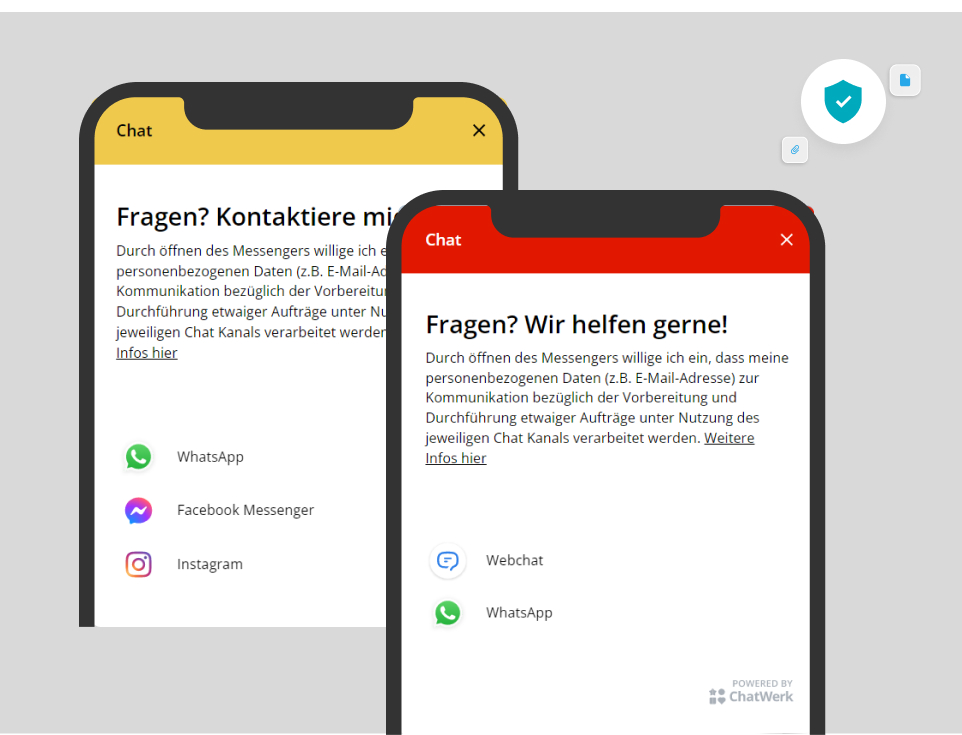
With the WhatsApp Business API, such as ChatWerk, your chats and company are always protected by "Privacy by Design". This concept offers you and your company the Touchpoint Generator, which enables the immediate creation of an informative landing page. This allows users to learn about data processing in advance and select their preferred messaging service.
Furthermore, privacy policies are easily accessible. Chat initiation is combined with a welcome message that points out data usage and offers detailed information via a privacy link. This ensures transparency and traceability of the data usage history in chats.
Customers can easily opt out of further communications by sending a keyword (“STOP”), which ensures their preferences are respected and prevents any further interaction from the company until the customer initiates contact again. This is handled via the WhatsApp Business channel.
Protect your data and your customers' data
It is very important that users regularly review and customize their privacy settings on platforms like WhatsApp to ensure effective management. Especially when using photos and audio files in the application, it is crucial to maintain compliance and make the necessary adjustments.
An important note: We have just discussed in detail the importance of data protection in WhatsApp and how users can optimize settings for their personal and business needs.
The key to success lies in being proactive. Clear communication with your data protection officer is fundamental to protecting personal and business data. It is crucial to stay informed and adjust your settings regularly – every step counts. Whether you use the application privately or run a business, WhatsApp offers various ways to keep your account secure, especially by choosing a GDPR-compliant provider when integrating it into business processes.
Do you have any questions or are you interested in integrating WhatsApp into your business?
Do not hesitate to contact us or your data protection officer. With the right approach and conscious use, you can unlock the full potential of WhatsApp while keeping your data protected.
Tips for better data protection
Here are some tips to increase your privacy on WhatsApp:
- Use a strong passphrase: A strong password protects your account from unauthorized access.
- Enable two-factor authentication: This additional layer of security makes it harder for unauthorized individuals to access your account.
- Disable read receipts: This prevents your contacts from knowing whether you have read their messages.
- Use a secure connection: Make sure you only use WhatsApp over secure networks to protect your data.
- Download the official WhatsApp application from secure sourcesMake sure to download the app only from the official Apple and Google app stores to protect yourself from fake apps and potentially harmful software.
WhatsApp privacy risk: The blue checkmark
The blue checkmark in WhatsApp indicates that a message has been read. However, if you don't want your contacts to know whether you've read their messages, you can turn off read receipts. This enhances your privacy and gives you more control over your communication. To do this, go to Settings, select "Account," then "Privacy," and disable the "Read receipts" option.
Alternatives to WhatsApp
There are many Alternatives to WhatsAppthat offer privacy advantages. Some of the best-known alternatives are Signal, Threema, and Wire. These messenger services provide end-to-end encryption and other features to protect user privacy. Signal, for example, is known for its strict privacy policies and the minimal data it collects. Threema and Wire also offer robust security features and are particularly popular in Europe. However, it is important to note that every alternative has its own pros and cons. Before choosing an alternative, you should carefully weigh your own needs and requirements.
The future of data privacy
The future of data privacy for WhatsApp and similar services brings challenges—above all, the balance between security and privacy. Companies and users alike are called upon to take responsibility, stay informed about rights and risks, and implement both technical and legal measures.
New technologies and clear data protection regulations will play a central role. Only through continuous adaptation, transparency, and education can a trustworthy and secure digital space be created in the long term.
Lerne noch mehr über Kundenkommunikation
Weitere spannende Blogartikel rund um Marketing, Automatisierung und digitalen Kundenservice.


